

Hi Darrell,
The correct way to cover one day is to run from 25th December 2026 at 00:00 to 26 December 2026 at 00:00 (24 hours) and ignore year on dates. Ensure it runs every week as 52 weeks is not a full year.
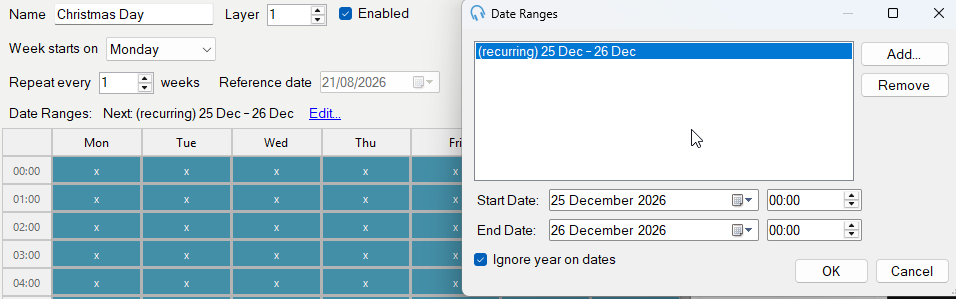
I have just tested this on the latest version and it is work as I would expect.
I just tried and I have the latest version. It will not let me remove AM or PM or change the times to 00:00. It sends it back to 12:00. Is there something else that needs to be changed?
On 12 hour clock, select 25 Dec 2026 12:00 AM to 26 Dec 2026 12:00 AM
The important part is that you do not select the same date (25 Dec 2026) for both as that is a zero-length time.
It appears as long as I changed it to the start and end date you showed it works. regardless of the AM/PM. I just went to 2027 and it moved to Saturday as it should. Thank you.
I will make sure the user interface is updated to ensure it is clearer what is happening. I understand your confusion.
Darrell Heimbach
Please fix "Ignore year on dates" so that if a clock is assigned a date range of Dec 25 - Dec 25, it only overwrites the schedule grid for that exact calendar date, regardless of what day of the week it lands on. This would allow placement of the special clock in every day of the special grid without having to move it a day every year for the next year.